
What it checks
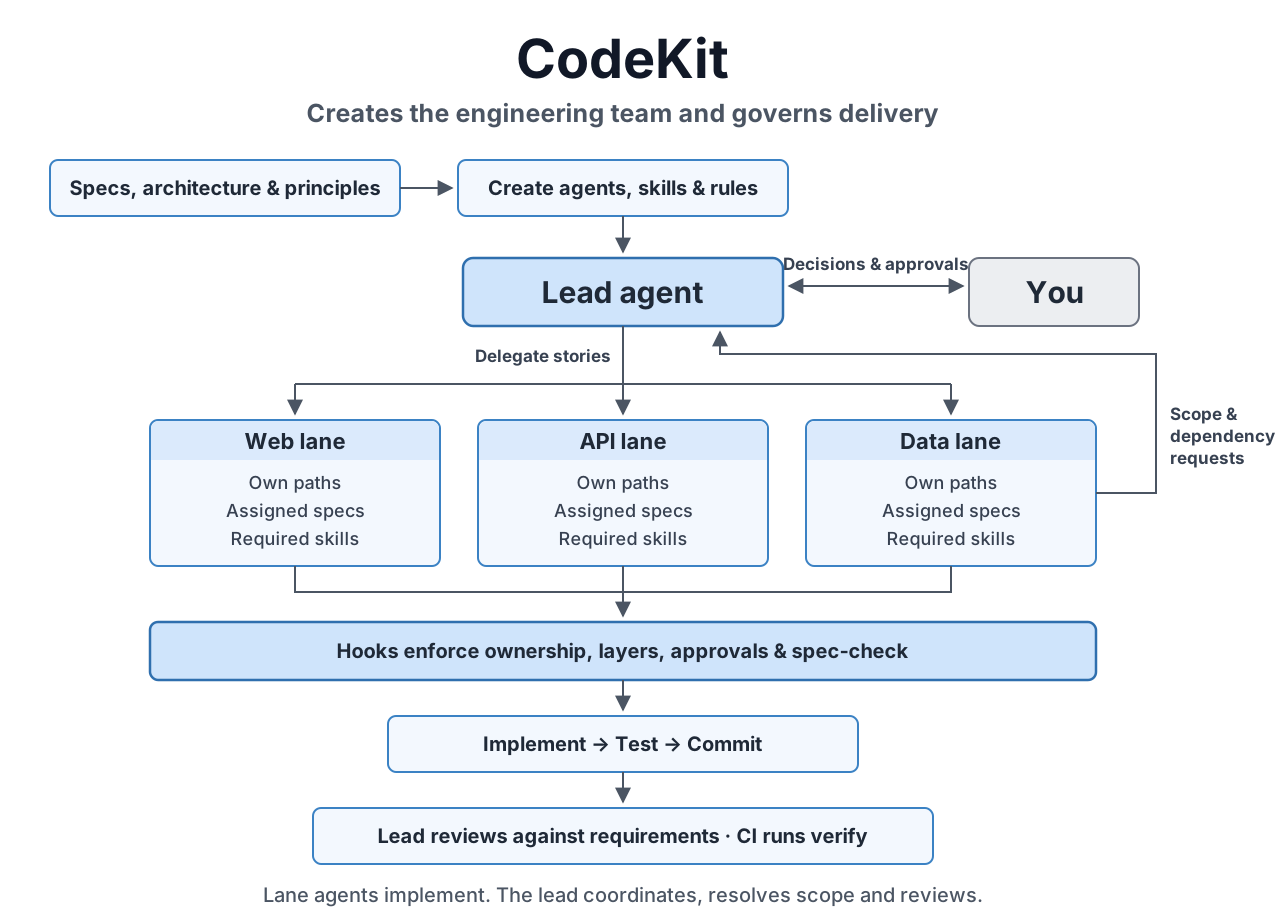
- Each agent stays in its own area. The web pages agent changes web pages, the database agent changes the database code. The lead writes the shared definitions and hands everything else out. Any other helper agent can only read.
- Your architecture stays intact. You list the parts of the app and what each may use. A change that would make one part depend on something it shouldn't is refused before it's saved.
- Important files have a paper trail. Changes to shared definitions, database schemas or the rules themselves are recorded with who approved them and why, in the same commit.
- Read the spec before writing code. Before an agent writes code for a task, it lists every requirement the task must meet and any open questions.
- No risky shell commands. No force-pushing, no committing straight to main, no skipping checks, and no new libraries without approval. You can add your own, such as deploys.
- Done means done. Before any agent finishes, its changes are checked: every file is one it was allowed to change, the architecture holds, and your project's tests and type checks pass.
- The same checks run on pull requests, so work done outside Claude Code is held to the same rules.
From an idea
Type /code-kit:next and describe what you want, in a sentence or a paragraph. code-kit asks the questions that shape the build a few at a time, each with a suggested answer, and writes every decision down. You end up with a short brief, a specification per area with numbered requirements you can test, an outline of the architecture, and a plan split into tasks. It then turns that into rules and agents, shows you, and switches nothing on until you approve. It also asks how hands-off you want it to be.
How the build runs
The lead starts every task that's ready, each with its own agent working in its own copy of the code, several at once. Each agent checks its task against the spec, builds it end to end, names the requirements in its tests, and commits. A reviewer agent reads each finished piece of work and grades what it finds. The lead then reviews it against the requirements: if something is wrong, the work goes back with a list of problems. Work that passes joins a queue and is merged one piece at a time, each checked again against the latest code.
Between your messages, code-kit keeps this going: when the lead is free, it's given the next step. An agent that goes quiet is nudged, then restarted. If a step keeps failing, it comes to you instead.
What you see
In Claude Code 2.1.287 or later, in the terminal or the desktop app:
- A summary above your prompt: the goal, what the lead is doing, the next step, each agent's current action, and anything waiting on you, with a key to answer.
- Lanes: each agent with its task, what it's doing right now and how long ago it last did something, and a small pixel character showing its state.
- Code map: the files a task touches, grouped by part of the architecture, lighting up as agents work on them.
- Trail: every requirement traced to the tasks that deliver it, the code they changed and the tests that check it, with gaps marked in red.
- Queue and usage: the work waiting to be merged, and how many tokens each agent and task has used.
Approvals
Some things need a person: adding a library, changing a shared definition, editing the rules. When an agent needs one, its action waits while code-kit asks you above the prompt, and goes ahead once you approve. You can also approve in the chat, or let the lead approve on its own within limits you set, for example libraries with a permissive licence that are widely used and recently maintained. Every approval is recorded with its reason.
Commands
| /code-kit:next | Works out where the project stands and does the next step. |
| /code-kit:spec-design | Turns an idea into a specification, one decision at a time. |
| /code-kit:init docs/ | Suggests the rules and agents, from your docs or your existing code. |
| /code-kit:dispatch next | Starts every task that's ready, each with its agent. |
| /code-kit:review ST-12 | Checks a finished task; merges it or sends it back. |
| /lanes · /harness | Opens the lanes view, or the settings for how hands-off it is. |
| code-kit verify | Runs every check on a branch, in a terminal or on a pull request. |
| code-kit status | Shows the build against the specification. |
When to use it
When several agents work on one codebase, your architecture is worth protecting, some files need a record of who changed them, you want the code to follow a specification, and "done" has to mean the checks actually pass. For a quick script it's more than you need: the plugin does nothing in a project you haven't set it up for.